

Max Chagoya
Graph visualization SDKs help developers build interactive applications for connected data. They provide tools for displaying relationships and managing how a graph responds as people explore it. The capabilities vary by product, but an SDK can give developers a foundation for this work without requiring them to build every graph behavior from scratch.
In an application used over time, the first drawing is only a starting point. New relationships can enter the graph while someone is investigating it, and the view needs to make that change understandable without breaking the path they were following. The SDK's layout and interaction controls affect how well the application handles that moment.
This article explores how graph visualization SDKs work, the technical capabilities that support interactive graph applications, their practical use cases, and the key considerations when selecting an SDK for production environments.
What Is a Graph Visualization SDK?
A graph visualization SDK is a development toolkit for representing entities as nodes and their relationships as edges within an application. It provides APIs for supplying graph data, customizing visual elements, and controlling how that data appears on screen. Where the SDK includes layout tools, they determine the positions of graph elements; the rendering system draws the resulting view. Interaction APIs allow the application to respond when someone selects or explores part of the graph.
By providing reusable tools for layout, rendering, and interaction handling, an SDK can reduce the amount of functionality developers need to implement from scratch.
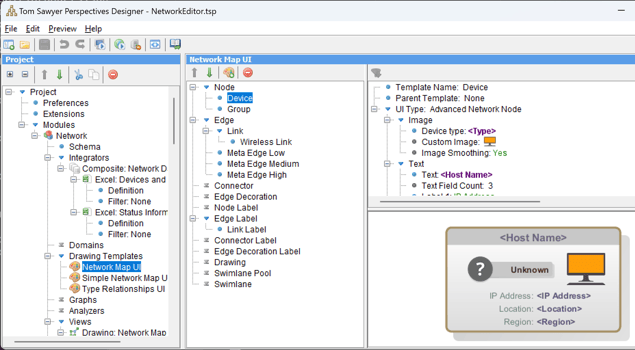
A graph visualization SDK like Tom Sawyer Perspectives enables engineers to build applications that are capable of rendering and interacting with graph-structured data.
When charting libraries fall short
Traditional charting libraries are commonly used to display metrics across categories or time. Some can also render interactive networks. The question is what happens when users need to work with the connections: expanding a node may bring new records into view, and the graph must remain understandable after they appear.
A graph SDK is built around that changing structure. Structural filtering can keep an investigation focused as more connections become visible. In a dense network, edge bundling can reduce clutter, provided users can still inspect individual relationships when those details matter.
For applications that respond to changing relationships in real time, evaluate how the SDK updates the view and preserves the user's context. A static network diagram alone cannot demonstrate that behavior.
How a Graph Visualization SDK Works
Connecting source data
Graph data may come from a graph database such as Amazon Neptune, a SQL query, or files containing JSON or CSV data. A REST endpoint is a way to retrieve records rather than a graph data format. The integration work depends on the SDK: it may provide a connector or transformation tools, or the application may need to retrieve the data and prepare it for the SDK. In enterprise environments, the visualization layer may also consume data prepared by existing ETL or ELT pipelines without replacing those processes.
Before the records become part of a graph, their identifiers and relationship references need to be checked. Otherwise, a later update may create a duplicate entity or an edge whose endpoint is missing. Validation and preprocessing also establish how relationship types, weights, and other attributes will be interpreted when more data arrives.
Mapping records to nodes and edges
The application maps entities to nodes and relationships to edges. In a social network, a user might be a node, while an interaction between two users becomes an edge with references to both endpoints. Frequency of interaction could determine edge thickness. Account status could determine a node's color. Those visual choices need to reflect the source attributes consistently as the data changes.
Stable identifiers make it possible to find and update an existing graph element instead of adding another copy. An SDK may provide indexing and APIs for modifying its graph model, but developers still need to define which source records represent the same entity and what each kind of connection means.
From graph model to interactive view
Once the graph model is available, layout calculates positions for its elements, and the rendering system draws the view. Interaction handling connects what appears on screen to application behavior: selecting a node, for example, can give the application an identifier it uses to open a record or request more connected data.
A change to the model then has to appear in the view. Rendering implementations may limit the detail drawn at a given zoom level or redraw only the affected elements. Techniques such as off-screen buffering can also help prepare updates before they appear. The availability and performance of these techniques depend on the SDK and the application's data.
Technical Requirements for a Production-Ready Graph Visualization SDK
Real-time rendering performance
Monitoring data can change a graph in different ways. A change in antenna load may update an existing visual cue, while a newly discovered connection changes the graph's structure. The second change may require a new layout. Repeatedly rearranging the entire drawing can make an investigation difficult to follow, even when each update appears quickly.
An incoming change has to reach the graph model before layout and rendering can reflect it. Incremental updates can reduce the amount of work required to reflect changes in the graph, although the affected layout region may extend beyond the modified elements. When events arrive in bursts, batching or debouncing may prevent repeated layout runs, but the application should make it clear if the displayed view is behind the source data. GPU acceleration can help with drawing in SDKs that use it; it cannot resolve a slow source query or an expensive layout calculation.
Measure these stages with the update frequency and graph density the application expects. Watch whether a selected element and its surrounding connections remain recognizable as the view changes. Where supported, incremental layout and brief transitions can help preserve that visual context.
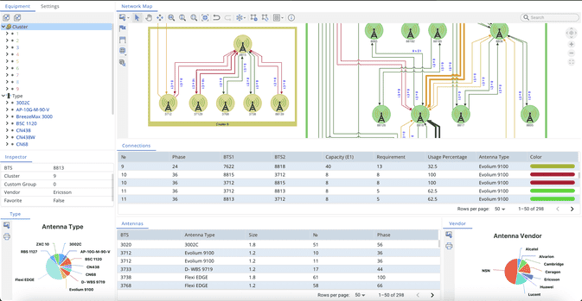
An example application for real-time rendering of antenna capacity and load in a microwave network.
Layout engines and styling options
Layout determines where nodes and edges appear, while styling helps explain what they represent. A hierarchical layout can make the direction of dependencies easier to follow. Circular layouts can emphasize predefined groups or clustered structures, while force-directed layouts can make certain connectivity patterns easier to observe through spatial arrangement. Orthogonal layouts route connections along horizontal and vertical paths, which can suit diagrams where those paths need to be traced clearly. The useful choice depends on the graph and the question the view must answer.
Control after the initial layout matters as well. If an analyst moves an element to compare it with another, a later update should not automatically undo that work. Check whether the SDK allows developers to tune or constrain layout behavior as the graph changes. Tom Sawyer Perspectives supports global, incremental, and constraint-based layouts, giving developers options for controlling how a drawing responds when graph data changes.
Visual cues need to connect to the underlying data. Edge thickness might represent connection weight, while a node's shape identifies its type. Color can distinguish clusters, but it should not be asked to convey a second meaning, such as operational status, without making the distinction clear to the user.
Interactive features
Zooming and panning help people reach the part of a graph they need, but exploration also depends on what happens after they select an element. An analyst may open its source record, reveal connected entities, or narrow the view to a relevant subgraph. The SDK's events and interaction controls need to support those actions within the surrounding application.
Contextual behavior deserves a practical test. A tooltip should stay associated with its graph element as the view moves. An embedded action menu must receive the user's input without triggering an unintended action on the graph beneath it. If users can move or lock elements, check what happens to those choices after the next layout update.
Framework integration (React, Angular, etc.)
Graph views often sit inside a larger application built with React, Angular, or Vue. Rendering a component inside the framework is only the first step: selecting a node may need to update a details panel, and the graph must respond when the application changes its data or removes the view from the page.
The integration approach also depends on the target environment. A browser-based application with a Java backend has different visualization requirements from a Java Swing desktop application. Developers should evaluate the available APIs, how graph events interact with application logic, and whether the visualization can be updated without rebuilding the surrounding interface.
Tom Sawyer Perspectives provides React APIs and Web Components for web applications, along with Java Swing components for desktop applications and .NET components for web and desktop development. A small integration prototype should demonstrate how graph selection updates an adjacent panel and how the application handles changes to the underlying data.
API access and data handling
An API must also support data that arrives after the initial graph is drawn. If an investigation loads another page of results, the application may need to add its nodes and edges while keeping the current selection and controls responsive. The relevant questions are whether developers can load results asynchronously, apply incremental changes, and manage batching and memory use as the view grows.
Export also needs a precise requirement. Saving an image captures the current appearance; exporting graph data or serializing application state serves different purposes, such as offline analysis, auditing, or reopening an investigation. Check which of these operations the SDK supports and what the application would have to implement itself.
Using Graph Analysis to Investigate Relationships
Interpreting detected clusters and communities
Nodes that appear close together on screen are not necessarily members of an analytically defined group. Clustering examines connections in the graph, but the result depends on the method and on the portion of the network analyzed. Tom Sawyer Perspectives, for example, documents clustering, k-Core, and m-Slice among its integrated graph analysis algorithms.
In a fraud investigation, a cluster of closely connected accounts may be worth examining, but the grouping is not evidence of fraud by itself. Coloring or collapsing the detected group can make the view easier to navigate, while access to the underlying connections lets an analyst assess what the result means. When comparing SDKs, check which algorithms they provide and whether the analysis runs on the full network or only the portion currently loaded.
Choosing between search, traversal, and shortest-path analysis
Searching for a node by an attribute helps a user find a known entity. Traversal answers a different question: breadth-first search (BFS) explores connections by distance in hops, while depth-first search (DFS) follows a branch before returning to explore another. A shortest-path calculation identifies a route according to the chosen measure, such as hop count or edge weight. These results should be presented according to the question each method actually answers.
The scope of the calculation matters. A path found within the loaded subgraph may differ from one found in the complete network, so the application should make that scope clear when it highlights a result. Focus or fading can guide attention to the relevant connections without removing access to the rest of the view.
Where Graph Visualization SDKs Add Value
Investigating suspected fraud in financial networks
A transaction rule can flag unusual activity, but an analyst may need to see how the accounts involved connect to other records. Shared devices or phone numbers can reveal indirect relationships, while transaction paths may point to a group that warrants closer examination. A graph visualization SDK helps build a view in which the analyst can follow those connections and retrieve the records behind them.
Filtering can keep a large investigation focused on relevant entities without treating a visually dense cluster as proof of fraud. The underlying transactions still need to be examined before anyone can draw a conclusion about a suspected fraud ring, synthetic identity, or money laundering activity.
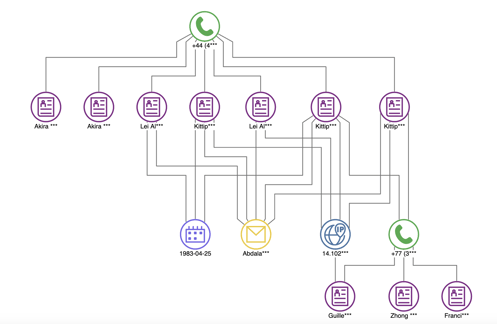
A cluster of suspected fraudulent transactions, accounts, and phone numbers and the relationships between them.
Tracing dependencies in distributed infrastructure
During an incident, an operator needs to trace dependencies from a failing service to other components that may be affected. In an application built with a network visualization SDK, services, databases, and network equipment can appear as connected elements alongside current monitoring data. An edge representing a service dependency must be distinguishable from one recording observed communication: each describes a different relationship and leads the investigation in a different direction.
For equipment spread across locations, a map can show where assets are, while the network view shows how they connect. Physical proximity alone does not establish a dependency. As new status information or connections arrive, the SDK can help update the view so the operator can continue tracing the incident without losing the original component.
Exploring gene and protein relationships in bioinformatics
Researchers use graph models to examine relationships among genes, proteins, and biological pathways. A visualization can bring connected records and their annotations into one view, making it easier to investigate a group of related elements or follow a pathway through the available data.
The interpretation depends on what each connection represents and the evidence behind it. A group detected in the graph may suggest a question for further research; its position or appearance does not establish a biological mechanism. The SDK is useful when researchers can move between the overall structure and the source information needed to assess a particular relationship.
Visualizing business processes and their execution
In a process model, nodes can represent tasks and edges can show sequence, dependency, or conditions. An interactive graph helps users follow a path through nested work and inspect loops or branches that are hard to read in a static flowchart.
The model describes how work is structured. Understanding how it actually ran requires execution data, such as event records linked to activities and cases. When that data is available, a graph view can help present the results of a separate process analysis and make deviations easier to investigate. The visualization alone does not perform process mining.
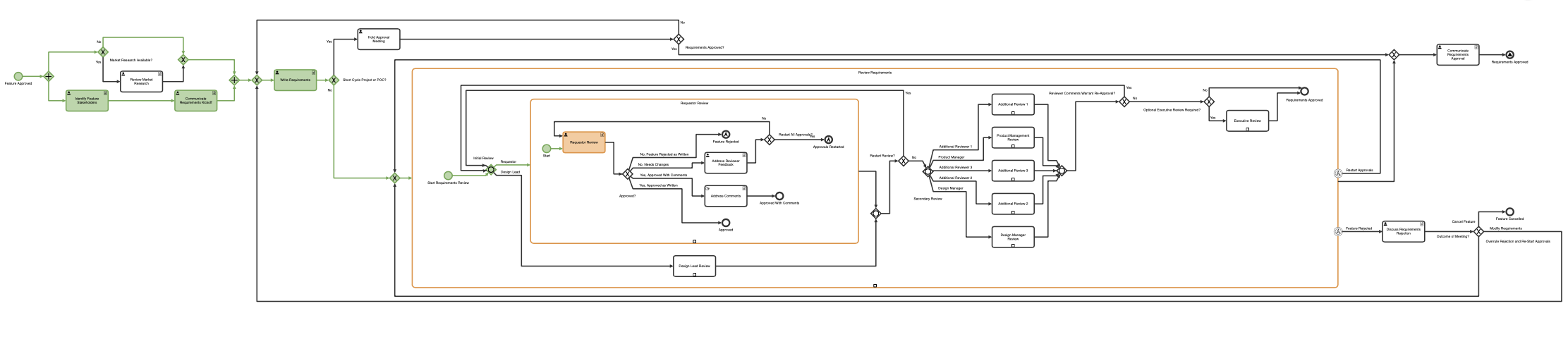
A graph visualization of the tasks, status, and dependencies in a complex business process.
Choosing a Graph Visualization SDK for a Production Application
The appropriate graph visualization SDK depends on the application’s primary requirements. A lightweight network viewer may prioritize straightforward embedding and interaction, while an enterprise graph application may require more advanced layout control, integration with multiple data sources, graph analysis, and configurable user workflows. These differences should guide the initial selection before development teams compare licensing models, implementation effort, and long-term maintenance requirements.
Comparing open-source and commercial SDKs
An open-source SDK may give developers room to inspect or modify its implementation. That flexibility is useful when the team has the capacity to maintain its own changes. A commercial SDK may provide application development tools or contractual support that reduce work the team would otherwise take on. Neither model establishes the better choice by itself; the comparison depends on the capabilities the application needs and who will maintain the result.
Estimate total cost of ownership over the same period for each candidate. Include applicable license and support fees, then account for the work required to integrate the SDK, test the application, handle upgrades, and maintain custom behavior. A lower initial cost will matter less if an essential interaction has to be built and maintained separately.
Testing performance and application fit
A toolkit that renders a small, static network quickly may behave differently when the graph is dense or changes during use. Test a representative task with realistic data: load the initial view, follow a connection, then add or update the records the application would receive in practice. This shows more than a published limit on the number of nodes.
Observe how long layout takes after a change and whether the view remains responsive while a user works with it. Memory use also matters over a longer session, especially when people repeatedly expand the graph. If a step is slow, determine whether the delay comes from retrieving data, arranging the graph, or drawing it before comparing SDKs on performance.
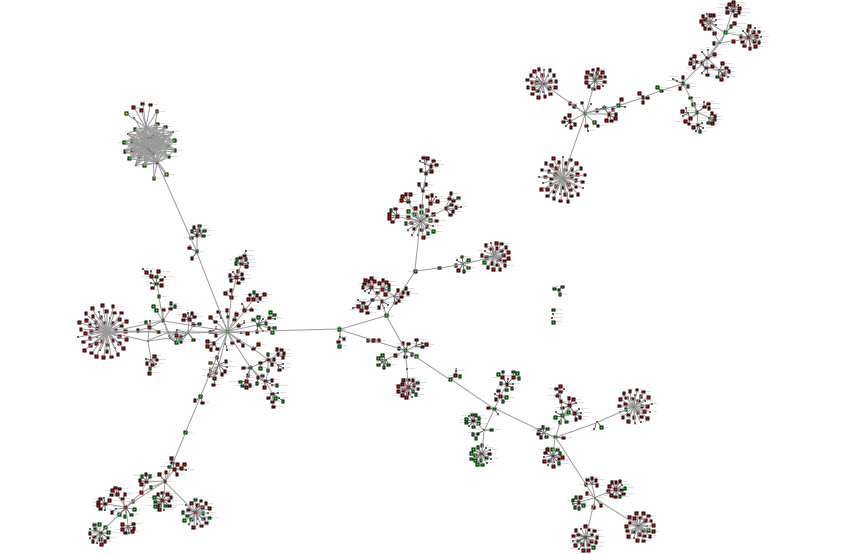
When choosing a graph visualization SDK, performance of rendering a large graph visualization like this sitemap should be considered.
Use the same representative data to complete a task in the intended frontend framework. In a graph analysis application, that might mean calculating a path, opening the records behind it, and saving the result for later review. The prototype then shows whether the investigation works as a whole, beyond the measured rendering and layout times.
Include behavior the application depends on, such as a custom node menu or rules that keep selected elements in place during layout. Record which parts the SDK handles and which require application code; that distinction affects integration effort and future maintenance.
Evaluating the SDK as a long-term dependency
Licensing terms need to cover how the completed application will be used and distributed. This is especially important when the SDK is embedded in software delivered to customers. Check the relevant rights, support arrangements, and conditions for upgrades against the planned deployment rather than relying on a general description of the license.
Documentation is another practical test. Try to build the representative interaction from the API reference and available examples, then examine how changes between releases are explained. That exercise shows how much development effort the team will need after the initial integration.
Tom Sawyer Perspectives as a Graph Visualization SDK
Tom Sawyer Perspectives is a low-code development platform and graph visualization SDK for building custom enterprise applications. It combines graph modeling, data integration, automatic layout, graph analysis, and interactive visualization within a configurable application development environment.
Developers can use Designer to configure graph models, layouts, and interactive views, test application behavior in Previewer, and extend the application through APIs when custom logic is required. This approach is relevant when a project requires more than an embedded graph renderer, particularly when graph visualization must work alongside enterprise data sources and application-specific interactions.
Tom Sawyer Software provides graph application examples that demonstrate how configured applications work in practice. The supply chain example allows users to explore relationships between raw materials and sourcing locations.
Final Thoughts
Choosing a graph visualization SDK involves more than evaluating how quickly it renders nodes and edges. Developers need to consider how the toolkit integrates with existing data sources, supports interactive exploration, handles changes to graph structures, and fits the application's long-term requirements. Testing these capabilities with representative data helps teams identify a solution that meets both technical and operational needs.
Tom Sawyer Perspectives offers an approach to application development in which graph visualization, analysis, and interaction can be configured and extended to meet specific project requirements.
To explore how Tom Sawyer Perspectives could support your application, review the available demos and examples or contact the Tom Sawyer Software team to discuss your development and integration requirements.
About the Author
Max Chagoya is Associate Product Manager at Tom Sawyer Software. He works closely with the Senior Product Manager performing competitive research and market analysis. He holds a PMP Certification and is highly experienced in leading teams, driving key organizational projects and tracking deliverables and milestones.
FAQs about graph visualization SDKs
How is a graph visualization SDK different from traditional charting tools?
Traditional charting tools primarily represent values across categories or time, although some also support network diagrams. A graph visualization SDK focuses on connected structures and provides tools for layout, interaction, and updating relationships as users explore the graph.
Can a graph visualization SDK handle large datasets with thousands of nodes and edges?
Yes, but performance varies with graph density and the complexity of the layout. SDKs may use incremental updates or selective rendering to manage large datasets, although the application may also need to limit how much of the graph is displayed at once. Scalability should be tested with representative data rather than assumed from the number of supported nodes.
Is a graph SDK suitable for real-time data visualization?
Yes, SDKs that support dynamic graph updates can be used in applications such as network monitoring and operational analytics. The application must be able to incorporate incoming changes without repeatedly disrupting the graph layout or making the view unresponsive. Real-time performance should therefore be tested under the expected update frequency.
How do graph visualization SDKs integrate with graph databases?
Some SDKs use a connector to retrieve graph data and map it to nodes and edges; with others, application code performs that step. Tom Sawyer Perspectives provides integrators for Neo4j and Amazon Neptune. In either case, source identifiers need to remain consistent so that a later query updates an existing entity rather than creating a duplicate.
How much control can developers and analysts have over graph layout?
It depends on the SDK. Developers may be able to configure layout rules, while analysts may need to move or pin elements during an investigation. Test whether those adjustments survive graph expansion and another layout run. If the investigation must be reopened later, check whether the application can save the adjusted view.
How do graph visualization SDKs support custom interactions and overlays?
An SDK may expose selection events that application code uses to open a details panel or attach a menu to a node. Check whether the overlay stays aligned when the graph moves and whether it handles pointer and keyboard input without activating the graph beneath it. The exact work divided between the SDK and the surrounding interface varies by product.
Can a graph visualization SDK combine geospatial and network views?
Yes, when the platform provides map and graph views connected to the same entities. The map shows where an asset is; the graph shows how it connects to other assets, regardless of distance. Tom Sawyer Perspectives supports both view types and synchronizes them, so users can follow an entity across views.
What deployment constraints affect graph visualization SDK choice?
Confirm where the application and any supporting services will run, how they can access the required data, and whether the license covers the intended distribution. A prototype in a vendor's demonstration environment does not establish that the same integration will work under the application's deployment and access requirements.
Submit a Comment